0.1

by Brendon Welch

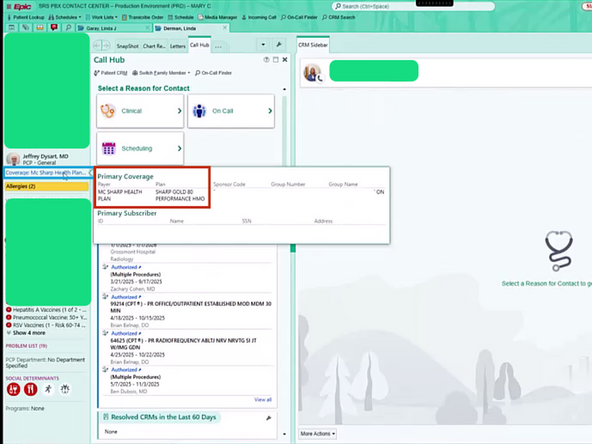
  1. Always verify that a patient is insured by Sharp.
    • Always verify that a patient is insured by Sharp.

    • Click the Primary Coverage link

    • Verify the Payer and Plan

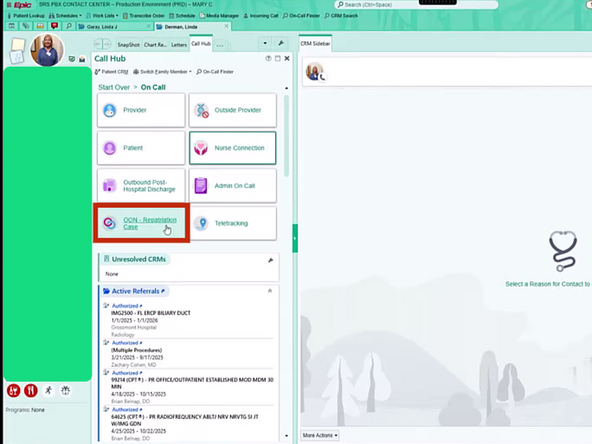
  2. Go to the Call Hub tab
    • Go to the Call Hub tab

    • Click On Call

  3. If you do not see all the On Call options:
    • If you do not see all the On Call options:

    • Click View All

  4. Select OON Registration Case
    • Select OON Registration Case

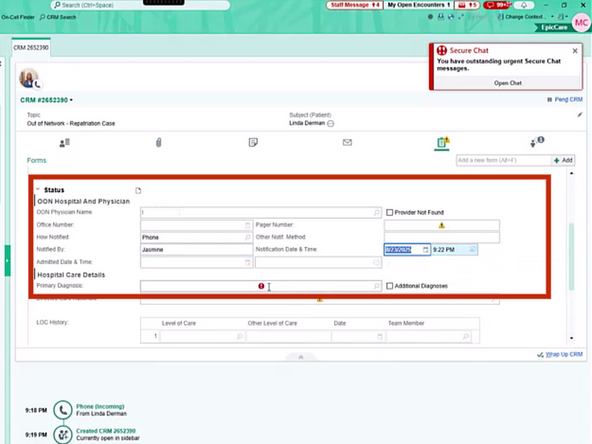
  5. Complete the Required Fields with the caller
    • Complete the Required Fields with the caller

  6. Click the Clip Board icon
    • Click the Clip Board icon

  7. Click the OON Admissions Documentation Form
    • Click the OON Admissions Documentation Form

  8. Complete the Required Fields with the caller Complete the Required Fields with the caller
    • Complete the Required Fields with the caller

  9. Click Wrap Up CRM
    • Click Wrap Up CRM

  10. Click Route
    • Click Route

  11. Click Close Hub
    • Click Close Hub

Finish Line

Brendon Welch

Member since: 3/4/21

21,311 Reputation

305 Guides authored

0 Comments

Add Comment