Introduction
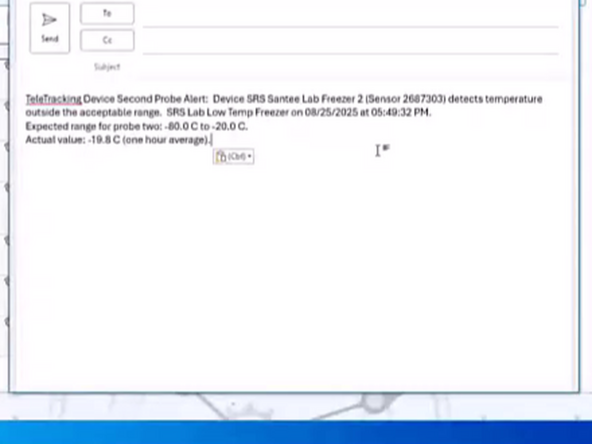
TeleTracking alerts will come to your Sharp email. This guide will outline the process of reporting the event.
-
-
Identify and contact the on-call staff within 10 minutes of receiving an alert. Read and give them the alert info. If the person responsible does not answer, leave a detailed message with alert information, including the sensor number and return PBX call (858-499-2616) to acknowledge it.
-
PBX must establish direct communication within 20 minutes and document the process via Teams and TeleTracking Prod (https://temptracking.sharp.com:82/alerts).
-
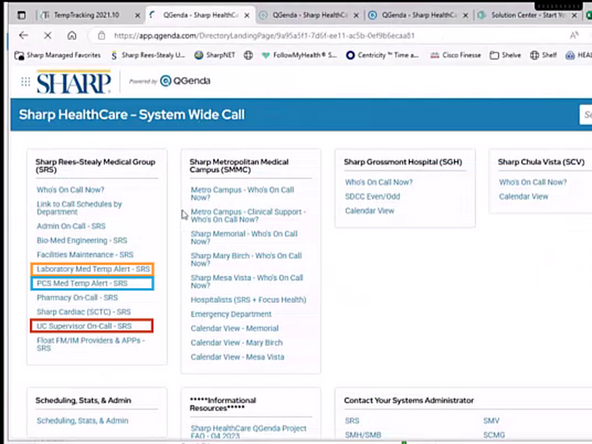
From the Homepage of Qgenda:
-
Click On-Call Schedules
-
-
-
If the alert mentions Lab:
-
Contact the Laboratory Med temp alert on-call person for that site
-
If no lab is mentioned and only med fridge:
-
Find the on-call via the PCS Med Temp Alert
-
If an alert has urgent care mentioned:
-
Find the UC Supervisor On-Call
-